Tuesday, September 8, 2009

Mobicents/JBCP & JBoss World 2009


I'm back from JBoss World 2009 that took place in Chicago together with the RH summit and the event was again awesome this year !
First I have to admit that the weather in Chicago was perfect and it helped raise this city as one of the best I've been so far in the US : very good public transportation, great architecture, LOTS of cultural events, plenty of parks, beaches on the lakes, ...


Tuesday was kind of pre-Jboss World day, it was mainly registration and partner pavillion opening. Me & Vladimir were tending the booth with other JBoss people and checking the partners out.
We got to meet and finally put a face on a lot of JBoss colleagues and people from our community (I won't cite any company names, but they will recognize themselves :-) ) getting at the same time great feedback on Mobicents/JBCP and evangelizing.

On the next day, we had a great keynote from our CEO, Jim Whitehurst, here is a phrase I thought I'd never hear in a CEO's keynote : "if we all had to walk around naked, we'd all spend more time at the gym" which seems to define the open-source spirit pretty well to me :-)

Wednesday, I attended Bela Ban's talk on Large clusters which was really interesting and I would recommend everyone interested in HA to check it out.I got to talk to the Jopr (JBoss ON is the corresponding product) team and we got this idea of integrating Mobicents to send text messages or call phones with DTMF recognition whenever there is some alerts in the cluster so that the IT monitoring team using Jopr can take some action whenever there is a problem. A proof of concept should be available soon :-)

Then Vladimir had it's BOF on Rapid VoIP Development Environment - SIP Servlets 1.1 (JSR-289), SEAM Telco Framework, Ruby on Rails, Eclipse VoIP Tooling
Unfortunately, we were competing against another BOF about Seam & JSR-299 containing all the JBoss Rock stars : Dan Allen, Pete Muir, Gavin King, Emmanuel Bernard, Max Rydahl Andersen and special guests; so the attendance was a bit lower than we expected but the feedback from the audience was great and had so much interesting questions that we finally got kicked out of the room :-)

Thursday, I went to see the new JBoss project GateIn that has been announced which is the ExoPlatform/JBoss Portal joint project. Definitely Interesting stuff, their booth was packed all day long and the project and UI are very slick. Those guys were definitely interested in Mobicents as well to be able to send SMS from the portal or click to dial kind of portlet, ... so a another proof of concept should see the light soon here as well.

In the afternoon, I went to see the Web Beans and HornetQ (JBoss Messaging renamed) presentations which were both of great quality.


Finally, we went to the Museum of Science and Industry party sponsored by IBM which was a lot of fun and then did a bit of pub crawling, on which I won't reveal the dirty details :-)

The last day was actually half a day and I attended to Bob's Mc Wirther presentation on TorqueBox which was the best one I attended too.

My session was among the last ones which was not very convenient because a lot of people already left the conference (1/3 to half I would say) but the attendance to the session was still pretty good (around 30 people in the room) and the presentation was very well received with a lot of feedback and exchange with the audience once again.

To wrap up on JBoss World, I would say that this was a rather good success for Mobicents/JBCP, it was very well received with a lot of people baffled by the platform and how it grew up in a year.

I uploaded my presentation here

So Thanks for coming and for coming at us, talk to us we love that, meeting the community in person and we will make sure that next year will be even better :-)

Update : For more pictures from chicago, see here : http://picasaweb.google.com/jean.deruelle/Chicago2009#

Thursday, September 3, 2009

Mobicents 2009 Team Meeting in Brno

Hello fellas,

Last week was a big event for the Mobicents guys as we all got together in this beautiful city of Brno located in Czech Republic.
Everybody on the team gave an overview of what we did over the last year and the roadmaps ahead for the next year and I have to tell you that this is stunning how much has been achieved in a one year timeframe under the Red Hat :

I'm really amazed to see at which pace is growing the Mobicents Platform and the community around it that is helping us out in an incredible number of ways from testing out the projects, interoperability to contributing code, ... that proves the value of open source, collaboration and sharing which are the core values of Red Hat and JBoss.
All of this to say "Thank You" to our beloved Mobicents Community.

I had 2 talks scheduled on Mobicents Sip Servlets :
  • First, as I said above on the achievements, challenges and goals/roadmap which you can find here
  • Second, on the HA plans and challenges not only for Sip Servlets but for JAIN SLEE as well so that we have a common architecture and frameworks for both our containers to ensure consistency and lower code duplication as much as possible.
As we move forward, we plan to continue investing and contributing to the NIST SIP Stack Reference Implementation of JAIN SIP Specification which is at the core of our projects (kudos to Ranga for being of great help whenever we need him). Those contributions will be mainly targeted at performance improvements, bug fixes, new features (lazy parsing, NIO, ...) and HA support.

It was great to understand what the other team members and other Mobicents projects have been up to and see their roadmaps and last but not the least, we got to have some fun to chill out a bit of the hard work of the day


so here is a part of the Mobicents team after work waiting to get into the action to go clubbing :

Silas and Eduardo showing the Mobicents Team winning the Beer Contest :

The Mobicents Team being teached by the local czech girls where the good places are in town


So Cheers guys !

Tuesday, July 21, 2009

Enable Flash on Google Chrome Linux Dev Build

Hey,

Looks like the google chrome dev build on linux don't come with flash enabled by default. This has been preventing you from using it on linux ? Here is a little 3 commands process that get you the google chrome plays flash on ubuntu (on most of the flash enabled site) :


sudo mkdir -p /opt/google/chrome/plugins
sudo cp /usr/lib/flashplugin-installer/libflashplayer.so /opt/google/chrome/plugins/
/opt/google/chrome/google-chrome --enable-plugins


Feel free to comment if you have more hacks to enable other plugins on google chrome linux dev builds, I'll update the post :-)

Friday, July 17, 2009

Mobicents/JBCP at JBoss World 2009


It's this time of the year again where all of JBoss is regrouping together to present you the latest and greatest and for the first time, the event is even co-located with the Red Hat Summit for an even more incredible event since with the same pass you get access to both conferences !

For those of you that are interesting to check what Mobicents / JBoss Communications Platform is up to, we have two dedicated sessions this year :

First Valdimir Ralev will be presenting, on September 2nd at 5:45 PM, in its BOF session Rapid VoIP development - SIP Servlets 1.1, Seam Telco Framework, JRuby on Rails, Eclipse VoIP tooling, you can gather more information on his blog post as well

For my part, I'll present, on September 4th at 11:00 AM, Writing Telco 2.0 applications with JBoss Communications Platform based on Mobicents
(
What's next track) which will be an overview of the main JBCP components - JSLEE 1.1 container (JSR 240), Media Server (JSR 309), SIP Servlets 1.1 container (JSR 289), Diameter Server and SIP Presence Service and will also show real world examples how telecoms leverage JBCP for innovative converged Telco 2.0 applications and blow you away with a converged Web/Telco 2.0 demo !

So make sure to regirster ASAP, the early bird registration ends today, Early bird registration extended until 17th.

Also upon user/developper demand, we could meet altogether for a Mobicents special or setup a Boot Camp there or just have a beer and talk all night so don't hesitate to ask for it !

Looking forward to meet you there !

Tuesday, June 2, 2009

Git Cheat Sheet or My Reminder against git headaches

Ok since I'm a git noob and I'm working on the move from JBoss Rails to the new Torquebox. I need to hack the Telco part of Torquebox so that any JRuby app located in Mobicents Sip Servlets on JBoss 5 can setup and handle SIP calls. Since the torquebox repo is git based and I'm usually dealing with svn or cvs, and I messed up quite some times already with git (even after checking out the famous git svn crash course), I'll use this post to be a placeholder for the thing I usually do so that me an git get along very well.

First things first, the repo is already created on git hub so I'll just check it out using :


$ git clone git://github.com/torquebox/torquebox.git


Since Torquebox is using a notion of submodules :

I need to checkout the underlying submodules, this is achieved by doing :


$ cd torquebox
$ git submodule init
$ git submodule update


Since the master branch is locked up, I use for each module the following command to be able to push my changes to the master branch :


$ git remote add central git@github.com:torquebox/torquebox.git
$ cd torquebox-core
$ git remote add central git@github.com:torquebox/torquebox-core.git
# and so on for each submodule


Then I hack away and do my changes in the various torquebox project. When I'm ok with my changes, I use the following to commit :


$ git commit -a


If there is files or directories that needs to be added to the commit, I usually do :


$ git add 'filename'
# example : git add src/main/java/org/torquebox/ruby/enterprise/sip/sip_environment_builder.rb


This will commit things only locally, then I need to push everything to the central repo located on github, this is done by doing :


$ git push central master


Sometimes I get into a no-branch strange state (don't ask me why :-)) and I end up in no branch at all, you can check on which branch you are by doing :


$ git branch -a


The following command can be useful too :


$ git status


so when I'm on no branch, to recover, I use the following commands sequence :


# going back on master branch
$ git checkout master

# checking the lost commits on the no branch
$ git fsck --lost-found

# the previous command will out put something like
# dangling tree a628672f320e4e311a59ce4bcd879125500141ff
# dangling commit 69ade48b3183ffc7a4e09cf87a1d0e5cedaa39bc
# to merge the last commit into the master branch I just switched to
$ git merge 69ade48b3183ffc7a4e09cf87a1d0e5cedaa39bc

#then I can push to github again
$ git push central master.


I'll update this blog post once in a while on my path to non newbiness to git.
Please comment to make me understand things a bit further or advice me on some good eclipse plugin that would avoid me such pain...

Back to git now

Update : Ranga gave a link with a few more tips http://sipx-wiki.calivia.com/index.php/Mirroring_sipXecs_subversion_repository_with_git#Making_and_committing_changes

Update 2 : very nice and thorough visual tutorial http://www.ralfebert.de/blog/tools/visual_git_tutorial_1/

Friday, April 3, 2009

JRuby VoIP app on JBoss 5 reloaded - Look Ma ! My pure JRuby app can now receive phone calls !

Following on the previous blog (My JRuby-Rails app on JBoss and Mobicents can make Phone calls !), we took things a step further in the JRuby Telco integration with JBoss 5 and Mobicents Sip Servlets.

We thought this was a hassle to have to create a multi language jruby-java application for pure rubyists to be able to calls in their application, so we decided to remove the Java part altogether and allow the application to be a pure Ruby application handling VoIP to benefit from runtime modification (without having to redeploy anything) to cut development time drastically and in addition to that have all the benefits (Media support, Diameter support, STUN, advanced monitoring, clustering, failover, ...) of Mobicents Sip Servlets for free :-)

Note that this application will be bundled with our next 0.9 release that should be out very soon.

So let's go through a quick walk-through on how to do that in redoing the same application as in the previous blog post but this time pure Ruby :


The code source of the application is available here.
For the hackers that want to create it themselves here are the steps :

So let's create the application skeleton :
$ jruby -S rails pure-jruby-telco -d mysql

Go into the “pure-jruby-telco" directory, then modify the config/database.yml.
Adjust the adapter name, and instead of ‘mysql’ put ‘jdbcmysql’. You might also want to delete the lines starting with “socket:” or set it to tmp dir.

Here’s a simple example for the development environment:
development:
adapter: jdbcmysql
encoding: utf8
database: pure-jruby-telco_development
pool: 5
username: root
password:
socket: /tmp/mysqld.sock

Also edit the config/environment.rb to specify the gem dependency we have on the jdbcmysql adapter (this step is mandatory for freezing the dependencies in your app later on)


Rails::Initializer.run do |config|
...
config.gem "activerecord-jdbcmysql-adapter", :version => '0.9', :lib => 'active_record/connection_adapters/jdbcmysql_adapter'
...
end

Now, it’s time to create our database:


$ jruby -S rake db:create:all

The next step is to create some minimal scaffolding to create the complaint system

$ jruby script/generate scaffold Complaint customer_name:string company:string complaint:text sip_uri:string

$ jruby -S rake db:migrate

now, we will add the logic to make the phone call once a complaint has been created, to do that edit app/controllers/complaints_controller.rb and the create function should look like this :


def create
@complaint = Complaint.new(params[:complaint])

respond_to do |format|
if @complaint.save
# get the sip factory from the servlet context
@sip_factory = $servlet_context.get_attribute('javax.servlet.sip.SipFactory')
# create a new sip application session
@app_session = request.env['java.servlet_request'].get_session().get_application_session();
# create a new sip servlet request to start a call to the sip phone with from header equals to "sip:my_jruby_app_rocks@mobicents.org" and the to header equals to the sip_uri from the complaint
@sip_request = @sip_factory.create_request(@app_session, 'INVITE', 'sip:my_jruby_app_rocks@mobicents.org', @complaint.sip_uri);
# actually sending the request out to the sip phone
@sip_request.send();

flash[:notice] = 'Complaint was successfully created.'
format.html { redirect_to(@complaint) }
format.xml { render :xml => @complaint, :status => :created, :location => @complaint }
else
format.html { render :action => "new" }
format.xml { render :xml => @complaint.errors, :status => :unprocessable_entity }
end
end


Ok we are done with the web part that make phone calls, let's make the app able to handle phone calls, create a sip directory :
mkdir app/sip 


This directory will contain our sip controllers to handle SIP messages, so let's create such a controller, by adding a sip_handler.rb file, to the app/sip directory, containing the following code :


# Note that the class extend a JBoss provided sip controller called JBoss::Sip::SipBaseHandler
# that mimic the Java Sip Servlet class the ruby way
class SipHandler < JBoss::Sip::SipBaseHandler
# Handle INVITE request to setup a call by answering 200 OK
def do_invite(request)
request.create_response(200).send
end
# Handle BYE request to tear down a call by answering 200 OK
def do_bye(request)
request.create_response(200).send
end
# Handle REGISTER request so that a SIP Phone can register with the application by answering 200 OK
def do_register(request)
request.create_response(200).send
end
# Handle a successful response to an application initiated INVITE to set up a call (when a new complaint is filed throught the web part) by send an acknowledgment
def do_success_response(response)
response.create_ack.send
end
end


Please read the comments in the above code, they should be insightful on what's going on.
Ok that's it the app can now receive phone calls and handle the signaling part :-)

Let's prepare the application for deployment to the Mobicents Sip Servlets on top of JBoss 5 app server.

Now let's freeze the rails version and the associated gems dependencies we are using into our application so that if rails or a dependency is upgraded in the system, our application will always use the version we freezed and not the newly upgraded version of rails from the system. Note: this is highly recommended for production env and really is a best practice (google freeze rails for more information)
Note that freezing is mandatory if you wish to deploy your application to JBoss 5 with the jboss-rails plugin.

It is a 2 steps process, first freeze rails then the dependencies (in our case the jdbcmysql adapter)
Here is the command to freeze your rails application :
$ jruby -S rake rails:freeze:gems
Here is the command
$ jruby -S rake gems:unpack:dependencies
You can verify that it worked by issuing this command
$ jruby -S rake gems
That will produce the following output :

- [F] activerecord-jdbcmysql-adapter = 0.9
- [F] activerecord-jdbc-adapter = 0.9
- [F] jdbc-mysql = 5.0.4

I = Installed
F = Frozen
R = Framework (loaded before rails starts)


Let's add jboss-rails-support to the application so that it can be deployed and run on JBoss 5 and even start JBoss 5 from the commandline, grab the following zip and extract it to the vendor/plugins directory of our application.

Now grab Mobicents Sip Servlets latest binary snapshot and extract it to any location that suits you and set JBOSS_HOME env variable to it.

Then in JBOSS_HOME/server/default/deploy create a file called pure-jruby-telco.yml containing :

---
application:
RAILS_ENV: development
RAILS_ROOT: /home/deruelle/workspaces/mobicents-sip-servlets/sip-servlets-examples/pure-jruby-telco
web:
context: /jruby-telco
sip:
appname: PureJRubyTelcoApplication
rubycontroller: SipHandler


change the RAILS_ROOT in it to the location of your application.

Then let's roll and fire up the server, from the root directory of the application do
$ rake jboss:as:run


When the server has started go to the Mobicents Sip Servlets management console and for INVITE and REGISTER select PureJRubyTelcoApplication in the select box then click 'Save'. This will instruct the Mobicents Sip Servlets container to route INVITE and REGISTER requests to our JRuby application.

You're ready to test the application. Starts your favorite Sip Phone (wengo phone, linphone, ekiga, sip communicator, ...) and configure it to register to 127.0.0.1:5080 then go to http://localhost:8080/pure-jruby-telco/complaints

Create a new complaint and make sure that in the sip uri field you put the address of the sip phone as shown here
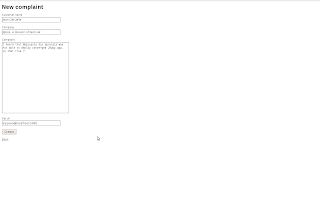

Now enjoy your first JRuby Rails Sip-Servlets application making a call to your sip phone.
Note that with some more coding and a VoIP provider such as http://www.callwithus.com, it could call real land-line phones or cell phones.

This application doesn't play any media yet so you hangup the phone whenever you like.
You can also call the application in dialing sip:pure-jruby-telco@127.0.0.1:5080 :-)

Wednesday, March 11, 2009

My JRuby-Rails app on JBoss and Mobicents can make Phone calls !

Following on the previous blog, I'll describe the steps to create a multi language JRuby-Rails application that utilize the power of the Sip Servlets 1.1 specification to make phone calls.

It will be bundled as a war and will be deployed on top of Mobicents Sip Servlets.

So the application will allow one to file complaints and every time a complaint is filed, a confirmation call is made to your phone saying that is has been taken into account and has been routed to a sales representative.

You can download the prebuilt application, if you're not interested in build it yourself and just want to test things out.
Note also that the source code for this app is available here
In any case, make sure you have JRuby correctly setup as explained in my previous post

Deploy the war to your favorite Mobicents Sip Servlets container. Currently only the current trunk (0.9-SNAPSHOT) is able to work correctly with a JRuby/Rails - Sip Servlets app, you can find the corresping binary snapshots of the trunk on our hudson job

Copy the war into your $JBOSS_HOME/server/default/deploy directory($JBOSS_HOME points to the location where you extracted Mobicents Sip Servlets zip) and then starts the jboss container as usual with
$ sh $JBOSS_HOME/bin/run.sh
When started, go to http://localhost:8080/sip-servlets-management and remove all configured applications in clicking on all the Delete buttons then click on Save.

You're ready to test the application. Starts your favorite Sip Phone (wengo phone, linphone, ekiga, sip communicator, ...) then go to http://localhost:8080/jruby-demo-sip-servlet-1.0-SNAPSHOT/complaints

Create a new complaint and make sure that in the sip uri field you put the address of the sip phone as shown here


Now enjoy your first JRuby Rails Sip-Servlets application making a call to your sip phone.
Note that with some hacking and a VoIP provider such as http://www.callwithus.com, it could call real land-line phones or cell phones.

The next step now is to integrate with the JBoss Rails Deployer and add to it the ability to recognize those converged telco applications, so that you don't need to recreate the war everytime you change the rails part of the app and benefit from the rails features of live modification and also of the JBoss enterprise features in your Rails application !

Also if you want to help us and contribute check our Google Summer of Code project ideas for Mobicents

For the hackers that want to create it themselves here are the steps :
(Note that the prebuilt application is integrated with Mobicents Media Server and as such has the media features of playing the audio but we will not see that below, it will just showcase the call setup.)

So let's create the application skeleton :
$ jruby -S rails jruby-sips-demo -d mysql

Go into the “jruby-sips-demo” directory, then modify the config/database.yml.
Adjust the adapter name, and instead of ‘mysql’ put ‘jdbcmysql’. You might also want to delete the lines starting with “socket:” or set it to tmp dir.

Here’s a simple example for the development environment:
development:
adapter: jdbcmysql
encoding: utf8
database: blog_development
pool: 5
username: root
password:
socket: /tmp/mysqld.sock

Also edit the config/environment.rb to specify the gem dependency we have on the jdbcmysql adapter (this step is mandatory for freezing the dependencies in your app later on)

Rails::Initializer.run do |config|
...
config.gem "activerecord-jdbcmysql-adapter", :version => '0.9', :lib => 'active_record/connection_adapters/jdbcmysql_adapter'
...
end

Now, it’s time to create our database:

$ jruby -S rake db:create:all

The next step is to create some minimal scaffolding to create the complaint system

$ jruby script/generate scaffold Complaint customer_name:string company:string complaint:text sip_uri:string

$ jruby -S rake db:migrate

now, we will add the logic to make the phone call once a complaint has been created, to do that edit app/controllers/complaints_controller.rb and the create function should look like this :


def create
@complaint = Complaint.new(params[:complaint])

respond_to do |format|
if @complaint.save
# get the sip factory from the servlet context
@sip_factory = $servlet_context.get_attribute('javax.servlet.sip.SipFactory')
# create a new sip application session
@app_session = request.env['java.servlet_request'].get_session().get_application_session();
# create a new sip servlet request to start a call to the sip phone with from header equals to "sip:my_jruby_app_rocks@mobicents.org" and the to header equals to the sip_uri from the complaint
@sip_request = @sip_factory.create_request(@app_session, 'INVITE', 'sip:my_jruby_app_rocks@mobicents.org', @complaint.sip_uri);
# actually sending the request out to the sip phone
@sip_request.send();

flash[:notice] = 'Complaint was successfully created.'
format.html { redirect_to(@complaint) }
format.xml { render :xml => @complaint, :status => :created, :location => @complaint }
else
format.html { render :action => "new" }
format.xml { render :xml => @complaint.errors, :status => :unprocessable_entity }
end
end
Ok we are done with the rails, let's create the war so that we can deploy it on a Java EE compliant container such as JBoss, for that we need to install Warbler :
$ jruby -S gem install -y jruby-openssl warbler
and set it up for our application with :
$ jruby -S warble config
Using jdbcmysql adapter, don't forget to uncomment this line in config/warble.rb:
config.gems += ["activerecord-jdbcmysql-adapter"]
Create the .war :
$ jruby -S warble war
Ok we are done with the rails app, now we need to create the java Sip Servlets code that will handle SIP related requests and responses and package it with the war.

So let's create the directory structure for the java classes :
$ mkdir -p src/main/java/org/mobicents/servlet/sip/demo/jruby
mkdir -p src/main/sipapp/WEB-INF
Now let's add the Sip Servlet class that will handle the SIP calls in src/main/java/org/mobicents/servlet/sip/demo/jruby :


public class JRubySipServlet extends SipServlet {

@Override
protected void doSuccessResponse(SipServletResponse resp) throws ServletException, IOException {
//acknowledge that the call is accepted by the phone
if (resp.getStatus() == SipServletResponse.SC_OK) {
SipServletRequest ack = resp.createAck();
ack.send();
}
}

@Override
protected void doBye(SipServletRequest request) throws ServletException, IOException {
//respond to the hangup request
SipServletResponse ok = request.createResponse(SipServletResponse.SC_OK);
ok.send();
}
}

Now let's create the sip.xml deployment descriptor in src/main/sipapp/WEB-INF :

<?xml version="1.0" encoding="UTF-8"?>
<sip-app>
<app-name>org.mobicents.servlet.sip.demo.jruby.JRubySipServletApplication</app-name>

<servlet>
<servlet-name>JRubySipServlet</servlet-name>
<display-name>JRubySipServlet</display-name>
<description>JRuby SIP servlet</description>
<servlet-class>
org.mobicents.servlet.sip.demo.jruby.JRubySipServlet
</servlet-class>
<load-on-startup>1</load-on-startup>
</servlet>
</sip-app>

Now let's create the web.xml deployment descriptor in src/main/sipapp/web.xml so that the application uses the development database


<web-app>
<context-param>
<param-name>rails.env</param-name>
<param-value>development</param-value>
</context-param>

<context-param>
<param-name>public.root</param-name>
<param-value>/</param-value>
</context-param>

<context-param>
<param-name>jruby.max.runtimes</param-name>
<param-value>1</param-value>
</context-param>

<filter>
<filter-name>RackFilter</filter-name>
<filter-class>org.jruby.rack.RackFilter</filter-class>
</filter>
<filter-mapping>
<filter-name>RackFilter</filter-name>
<url-pattern>/*</url-pattern>
</filter-mapping>

<listener>
<listener-class>org.jruby.rack.rails.RailsServletContextListener</listener-class>
</listener>
</web-app>

Now let's tie everything together by creating a maven pom.xml to bundle the jruby app and the sip servlets code together in a single war so create the pom.xml at the root of your project

<project xmlns="http://maven.apache.org/POM/4.0.0" xsi="http://www.w3.org/2001/XMLSchema-instance" schemalocation="http://maven.apache.org/POM/4.0.0 http://maven.apache.org/maven-v4_0_0.xsd">
<modelversion>4.0.0</modelversion>
<parent>
<groupid>org.mobicents.servlet.sip.example</groupid>
<artifactid>sip-servlets-examples-parent</artifactid>
<version>1.2</version>
<relativepath>../pom.xml</relativepath>
</parent>
<groupid>org.mobicents.servlet.sip.example</groupid>
<artifactid>jruby-demo-sip-servlet</artifactid>
<packaging>war</packaging>
<version>1.0-SNAPSHOT</version>
<name>JRuby Sip Servlet Demo Application</name>
<url>http://www.mobicents.org/jruby-sip-servlets.html</url>

<build>
<plugins>
<plugin>
<artifactid>maven-compiler-plugin</artifactid>
<configuration>
<source>1.5</source>
<target>1.5</target>
</configuration>
</plugin>
<plugin>
<artifactid>maven-war-plugin</artifactid>
<configuration>
<warsourcedirectory>
${basedir}/src/main/sipapp
</warsourcedirectory>
<webresources>
<resource>
<directory>tmp/war</directory>
<excludes>
<exclude>**/web.xml</exclude>
</excludes>
</resource>
<resource>
<directory>log</directory>
<!-- override the destination directory for this resource -->
<targetpath>WEB-INF/log</targetpath>
</resource>
</webresources>
</configuration>
</plugin>
</plugins>
</build>
</project>

Create the converged jruby sip servlets war with
$ mvn clean install